Spot Fake TNT SIM Registration Sites 2026
If you use TNT, here is the most important thing to know: not every SIM registration page you see online is real. Smart and TNT have already warned users about phishing messages that send people to fake SIM registration portals designed to copy the real one and steal personal information. They also said that if your Smart or TNT SIM is already successfully registered, you do not need to register it again.
Quick answer
A fake TNT SIM registration site usually shows up after a suspicious text message tells you to “re-register now” or says your SIM will be blocked. The link often leads to a phishing page that tries to look official. The safest move is simple: do not tap the link, do not enter your details, and check only through TNT’s official SIM registration channel or official Smart support channels.
What the real TNT registration process looks like
TNT says subscribers can register through the official Smart SIM registration portal, and it also lists official help channels such as Smart Stores, the hotline, Facebook Messenger, and the GigaLife app. TNT also says access to the registration site is free for subscribers. Smart Help separately says users can check whether a SIM is already registered through the GigaLife app or through the official registration portal.
That matters because fake sites usually try to pull you away from these official channels. If a message pushes you to a random website instead of the normal TNT or Smart path, that is already a warning sign.You can also read: TNT SIM Registration Identity Fraud Risks 2026
The easiest ways to spot a fake TNT registration site
The first red flag is panic language. Scam messages often say your SIM will be blocked, suspended, or limited unless you act immediately. Smart’s anti-scam page warns that scammers use urgency to pressure users into clicking fast without thinking.
The second red flag is a strange link. Smart says suspicious SMS often contain links to malicious websites. If the message sends you somewhere unexpected, that is a major warning sign. The safest habit is to type your destination yourself or open the official app instead of trusting a text link.
The third red flag is any request for OTP, bank details, or online account information. Smart says official Smart, TNT, and Sun customer care channels and authorized representatives will never ask for those. If a supposed registration page or support message asks for them, stop immediately.
One very important clue people miss
A lot of fake messages use the word “re-register.” That is a big clue. Smart and TNT publicly warned that people whose Smart or TNT SIMs were already successfully registered do not need to register again. So if a random text suddenly tells you to re-register, treat it as suspicious unless you verify it through an official channel yourself.
This is one of the easiest checks because it takes only a minute. Before doing anything, open the GigaLife app or use the official registration portal to see whether your SIM already shows as registered.
What fake TNT registration sites usually want
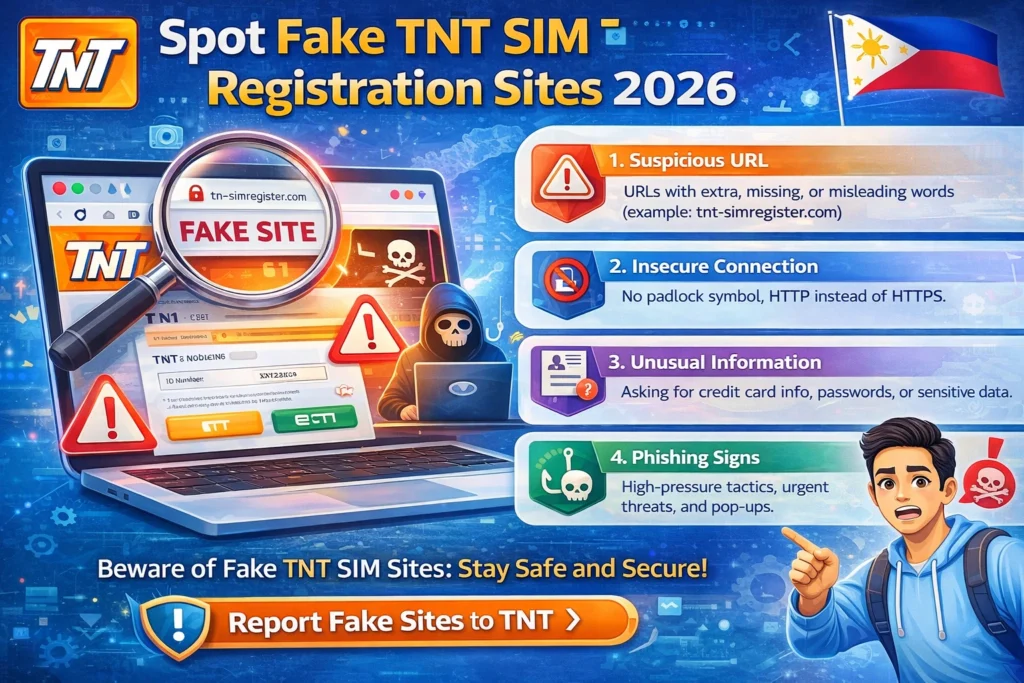
Most fake sites are trying to steal personal information. Smart and TNT said these fake portal messages are phishing attempts aimed at getting your private details. Smart’s official scam guidance adds that attackers often go after OTPs, banking information, or online account details too.
That is why this scam is serious. It is not just about your mobile number. Once scammers get enough information, they may try to reach the accounts connected to that number, including services that use SMS verification. Smart has also pointed users to its HuliScam reporting system so suspicious calls and messages can be reported and blocked faster.
How to verify a TNT registration page before you trust it
Start with the source. If the page came from a text link, that is already a reason to slow down. TNT says the official route is through its listed Smart channels, and Smart Help says official support is available through verified social channels and the hotline.
Next, check what the page asks for. A real registration flow asks for the normal SIM registration details. But Smart says official channels will not ask for your OTP, bank details, or online account credentials. If you see those requests, leave the page right away.
Then, confirm your status through a second official path. Smart Help says you can check in the GigaLife app or through the official portal and wait for the prompt that tells you whether your SIM is already registered. That is much safer than trusting what a text message says.
What to do if you clicked a fake site
First, stop entering information. If you have not submitted anything yet, close the page and do not go back. Then verify your registration status through official TNT or Smart channels only.
If you already shared details, especially an OTP or anything connected to another account, act fast. Smart’s scam guidance makes clear that these are exactly the details scammers try to steal. Report the suspicious message through Smart’s verified social channels, by calling *888, or through Smart’s HuliScam reporting channel.
If your SIM is lost, stolen, or compromised, Smart Help says the registered SIM owner can request a free replacement with the same number at any Smart Store, with a valid government-issued ID.
Simple tips that make you much safer
Do not trust random “re-register now” texts. Smart and TNT already warned about that exact trick.
Use only the official TNT or Smart registration and support channels listed by TNT.
Never share your OTP, banking details, or online account login information. Smart says official channels will never ask for them.
If something feels off, report it. Smart’s recent safety posts tell users to report suspicious links, messages, or numbers through HuliScam so scam activity can be tracked and blocked faster.
FAQs
Final Words
Fake TNT SIM registration sites work because they look urgent and official at first glance. But once you know the signs, they become much easier to spot. A random re-registration text, a suspicious link, or any request for OTP or banking details should be treated as a danger sign. The safest habit is simple: ignore the message, go to the official TNT or Smart channel yourself, and verify there. That one habit can protect both your number and the accounts tied to it