TNT SIM Selfie Rejection Reasons (2026 Guide)
Getting your TNT SIM registered shouldn’t be hard — but one thing many people struggle with is taking the selfie with their ID correctly. If your selfie gets rejected during TNT SIM registration, don’t worry! There are common reasons why this happens, and most of them are easy to fix.
In this article, you’ll learn the real reasons your TNT SIM selfie might get rejected and how to correct them so your registration goes through smoothly.
Photo Not Clear or Blurry
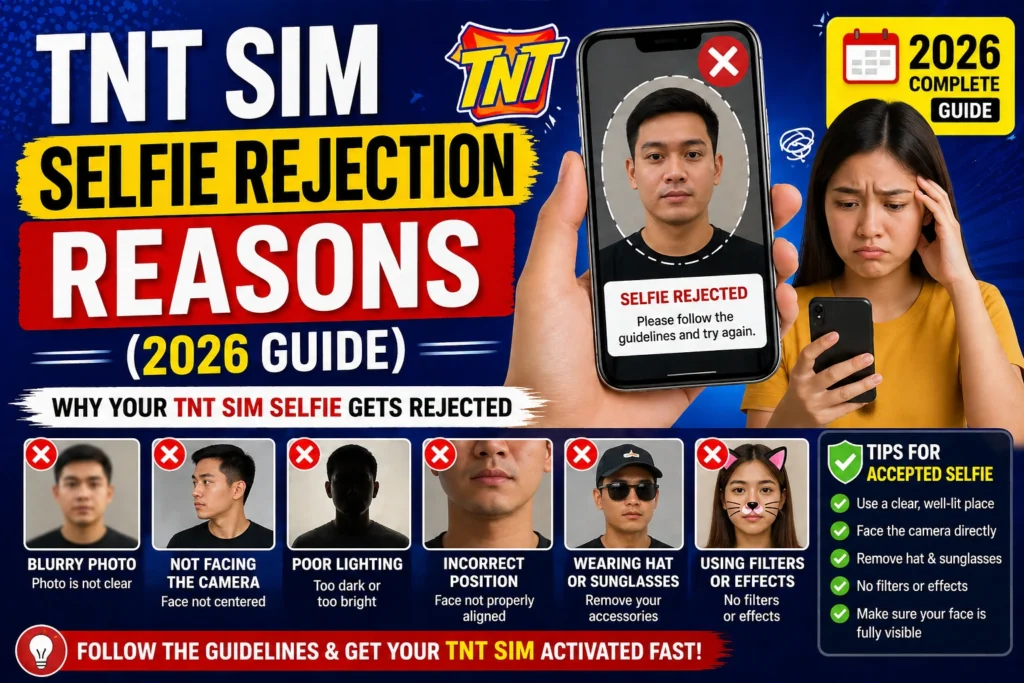
The most common reason a selfie gets rejected is because the photo isn’t clear. If the image is blurry, grainy, or too dark, the system cannot match your face with your ID photo.
Tip: Use good lighting (near a window or outdoors). Hold the phone steady and make sure both your face and your ID are clearly visible.
ID Not Fully Visible in Selfie
If part of your ID is cut off — like your photo, name, or ID number — the registration system can’t verify your details.
Tip: Make sure the entire ID is visible in the selfie and not being covered by your fingers or shadow.
Too Much Shadow or Glare
Shadows or glare from lights can hide important details on your face or your ID. This usually happens when the lighting is uneven or too bright.
Tip: Take your selfie in soft, indirect light. Avoid strong backlight or bright sunlight directly on the ID.
Face Not Matching the ID Photo
If your selfie doesn’t look like the photo on your ID, the system might reject it. This can happen if your expression is very different or your haircut or accessories make your face hard to recognize.
Tip: Look straight at the camera with a neutral expression. Remove sunglasses, hats, or anything that hides your face.
Wrong Angle or Distance
Selfies taken too close, too far, or at an odd angle can cause rejection. The system needs a clear shot where both your face and ID are easy to see.
Tip: Hold the phone at arm’s length, so your face and the ID are centered and visible.
Low‑Quality Camera or Poor Resolution
Older phones or low‑quality cameras might produce images that are difficult for the system to read. Low file resolution or compression can also cause problems.
Tip: Use a phone with a decent camera and make sure your photo isn’t too small or pixelated.
Uploading the Wrong Photo
Some people accidentally upload the wrong selfie or upload the ID photo instead of the selfie. This mistake is simple but common.
Tip: Always double‑check your file before uploading. Your selfie should show you holding your ID, not just the ID.
Wearing Face Masks or Accessories
Wearing face masks, sunglasses, or anything that hides your eyes, nose, or mouth can cause rejection because the system can’t verify your face.
Tip: Remove all face coverings and accessories before taking your selfie.You can also read: TNT SIM ID Photo Requirements Simplified (2026 Guide)
Background Too Busy or Distracting
While selfie backgrounds don’t cause rejection often, a very busy or cluttered background can make the system struggle to focus on your face and ID.
Tip: Use a plain or simple background for your selfie.
Uploading Wrong File Format or Size
Selfie uploads can also be rejected if the file is too large or in an unsupported format. Some portals only allow JPG or PNG files below a certain size.
Tip: Resize your photo if it’s too large, and make sure you upload the right file format.
FAQs
Final Words
A rejected selfie can be frustrating, but now you know the most common reasons and how to avoid them. Simple fixes like good lighting, holding your ID correctly, and keeping your face visible go a long way. With a clear selfie and accurate ID, your TNT SIM registration will be smooth and stress‑free.